SSR-Vault
Your password vault in hardware. Keys never leave the secure element — the local bridge service on the PC only ever sees encrypted data.
ATECC608A · ESP32-S3 · Secure Boot · Flash-Encryption · Chrome · Edge · Firefox
What it actually looks like
No mockups — original screenshots of the browser extension with a connected stick.
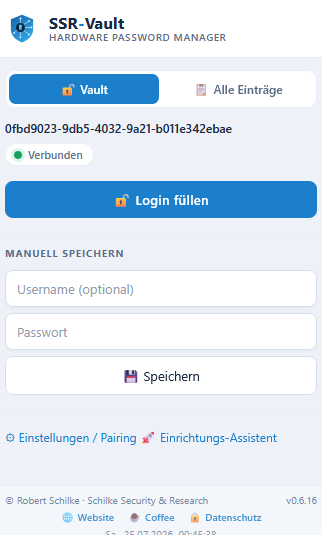
Popup after unlocking — fill login with one click, or save new credentials manually.

Settings & pairing — native host connected, active USB port, CSV import from other password managers.
A password manager whose secrets never leave the hardware
SSR-Vault is a USB stick that stores credentials inside a dedicated crypto chip. A browser extension fills in logins automatically; a small local service on the PC only relays the communication. Private keys are generated inside the secure element and stay there — they cannot be read out or exported.
Anchored in hardware
Microchip ATECC608A secure element on a LilyGo T-Dongle-S3 Secure (ESP32-S3R8, 8 MB PSRAM). Keys live in the chip, not in a file.
PIN-protected with self-destruct
Access requires a PIN; the failed-attempt limit is enforced by the crypto chip in hardware. After 10 wrong attempts the vault irreversibly self-destructs.
Browser integration
Chrome, Edge and Firefox. Autofill via an open-source extension (MIT) and a local native-messaging host. Tested on Windows 11. Linux is technically feasible and under consideration on request — not shipped yet. macOS is deliberately not planned.
Open-core
The browser extension is open source (MIT); the host and firmware are proprietary. The Freebird edition binaries are free to use.
What is certified — and what is not
We draw a clear, honest line here: what is certified is the secure-element IC inside the device, not the device as a whole. The heart of SSR-Vault, the Microchip ATECC608A, carries the following independently assessed properties:
- JIL-rated secure key storage — assessed against the JIL methodology "Application of Attack Potential to Smartcards and Similar Devices" (High rating of the key storage).
- NIST CAVP-validated algorithms — the chip's cryptographic implementations are validated through the Cryptographic Algorithm Validation Program.
- FIPS 140-3 ESV-certified entropy source — the hardware random number generator is validated to SP 800-90B (NIST certificate #E46).
SSR-Vault is deliberately not marketed as a Common Criteria EAL 4/5 certified complete device. A full EAL evaluation of the entire product is primarily demanded for procurement by government, defense and NATO — markets we do not serve. Instead we rely on certified components and transparent, standard cryptography.
If an organization requires a formal EAL evaluation of the device, one can be commissioned on request — with the evaluation cost borne by the requesting party.
SSR-Vault reliably protects against what actually endangers your credentials day to day: malware and keyloggers on the PC (passwords never leave the chip unencrypted), stolen password databases (there isn't one), a stolen or lost stick (PIN requirement + self-destruct), and a compromised bridge service on the PC (end-to-end encryption — it only ever sees ciphertext).
What we do not promise: protection against an attacker with the physical chip and a lab full of specialist equipment — think focused-ion-beam microscopy or chip decapsulation. That is nation-state and intelligence-agency territory, with six-figure budgets per chip. No consumer security product on earth genuinely withstands that, and anyone claiming otherwise isn't telling the truth.
The protection chain
- End-to-end into the browser — the entire path between the stick and the browser extension is encrypted. The local bridge service only ever sees ciphertext, never plaintext.
- Secure Boot + Flash-Encryption — the bootloader rejects any unsigned firmware image; the full flash contents are hardware-encrypted. That secures the firmware chain from the very first boot against tampering and read-out.
- Self-destruct after 10 wrong attempts — the encrypted vault is overwritten multiple times and the secure-element keys are regenerated or overwritten. The data is irrecoverably destroyed.
- One key per device — nobody knows it, not even us — every stick generates its own private keys during setup, using the secure element's hardware random-number generator. There is no master key, no central list, nothing we could hand over.
Trivial PINs like "1234" used to be a residual risk within the 10 allowed attempts. The stick now refuses such PINs itself: a digit, a letter and a special character are required, plus a blocklist of known trivial passwords — enforced directly in hardware, not just recommended in the text.
The algorithms we use
We disclose which standard algorithms are used — no home-grown crypto. We do not publish the exact protocol sequence; the wire-protocol specification is available under NDA.
Keys stay in the chip
Private keys are generated and stored inside the ATECC608A. They never leave the secure element — not even to the PC.
End-to-end encrypted
Secret fields are encrypted between the stick and the browser extension. The local bridge service only ever sees ciphertext.
Brute-force protection in hardware
The PIN failed-attempt limit is enforced by the crypto chip itself. Protection does not rely on a slow software function.
Signed firmware, encrypted flash
Secure Boot v2 only boots firmware images signed by us. The entire flash contents are encrypted via hardware AES-XTS. Updates are applied to the stick offline only (via SD card) — there is no network update path.
Manufactured in partnership with LilyGo
SSR-Vault is built on real, available hardware — not a homebrew chip, not a garage-scale one-off.
LilyGo T-Dongle-S3 Secure
SSR-Vault's hardware is based on the LilyGo T-Dongle-S3 Secure (ESP32-S3R8, 8 MB PSRAM, Microchip ATECC608A). LilyGo is our exclusive hardware manufacturing partner for series production — including factory activation of Secure Boot and Flash-Encryption for every unit produced, before it leaves the factory.
ESP32-S3R8
Dual-core MCU with 8 MB PSRAM, USB-C, native USB-CDC.
Factory hardening
Secure Boot + Flash-Encryption are burned at LilyGo per unit, not added later at the customer.
Compact form factor
USB-stick size — fits on any keychain, no separate cable needed.
Two hardware tiers, no software locks
The tiers differ in storage capacity and 2FA — written at the factory, but also upgradeable later from Freebird to Premium via a signed software license key. Both share the same hardening: secure element, Secure Boot, Flash-Encryption.
A secure, compact variant for everyday use — full hardware protection, compact limit.
- Storage slots 15
- 2FA / TOTP —
- Upgrade to Premium via license key
- Secure element / Secure Boot / Flash-Encryption ✓
The full product for anyone with many accounts and 2FA needs.
- Storage slots 400
- 2FA / TOTP ✓ on the stick
- Secure element / Secure Boot / Flash-Encryption ✓
Freebird → Premium upgrade is possible via a software license key — no new hardware needed, no shipping back. Pricing is preliminary and may still change before launch.
The software itself is fully usable at every tier (open-core) — OEM/B2B partners can additionally get white-label hardware and custom licensing on request: more on custom development.
How SSR-Vault fits in
No product is the best choice for every use case. Here's an honest, structural breakdown by product category — without disparaging any specific third-party product.
| Category | SSR-Vault | Cloud password managers | Local software managers | Pure FIDO2 security keys |
|---|---|---|---|---|
| Where does the vault live? | Inside the secure-element chip | On a third-party server (encrypted) | A file on the PC | Doesn't store passwords |
| Protection from PC malware | Yes — keys never in PC memory | Master password can be captured | Master password/file attackable | Yes, for the login itself |
| Protection from server breach | No server, no breach possible | Encrypted vaults can leak | No server | No server |
| Hardware brute-force lockout | Yes — ATECC attempt counter | Software-side (rate limit) | Software KDF only | Yes |
| Stores full credentials (autofill) | Yes | Yes | Yes | No — authentication only |
| Secure Boot + Flash-Encryption | Yes | N/A (no own hardware) | N/A | Vendor-dependent |
FIDO2 security keys and SSR-Vault solve different problems — FIDO2 authenticates you to a service, SSR-Vault manages and fills in your existing credentials. For many users the two complement each other rather than replace one another.
Bespoke security hardware
SSR-Vault is one of many possibilities. We develop bespoke security solutions on request — when it comes to security, a great deal can be built.
Crypto phone
Communication devices with hardware-backed encryption.
Secure pager
Receiver devices for confidential messages.
Private data vault
Offline storage for sensitive data, keys held in hardware.
Your idea
Have a security-related requirement? Let's talk.
Custom development is proprietary and tailored to your requirements — contact.
Setup & downloads
The browser extension is publicly available in the stores. Buyers receive the native-messaging host (Windows installer) together with their stick.
Setup installer (Windows)
Native-messaging-host installer — required for the browser extension to talk to your stick. No admin rights needed.
SSRVault-Setup-1.0.1.exe (24 MB)The firmware source code itself is proprietary and not publicly downloadable — the browser extension is MIT-licensed and open source.
In planning: a flagship with the highest hardware assurance level
Flagship on NXP EdgeLock SE050
For customers who require the highest assurance level already in the silicon, a separate flagship product is planned — built on the NXP EdgeLock SE050, a secure element certified to Common Criteria EAL 6+ (the SE050F variant additionally to FIPS 140-2, hardware level 4). A standalone product, same design philosophy.
Note: planned product. Availability and feature set are not yet finalized.